
Now Available in Production
Updated Line Item Value Lists Only Allows Current Vendor Contacts
What We Did
Primary and secondary Vendor Rep fields now only reflect current contacts.
The Details
Previously, the value list showed all contacts from vendors, regardless of whether the contact was marked as current or not. This resulted in duplicate values appearing in the selection list for primary and secondary Vendor Rep fields.
Figure 1: Updated Primary and Secondary Vendor Rep Fields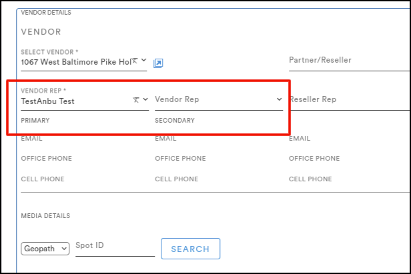
JIRA Ticket:
- IMXDEV-389
Updated Billing Export Handling for Special Characters
What We Did
Motionworks created a solution to identify and remove special characters that were incorrectly appearing in the Billing Export txt file prior to export. Billing Export files are now supported within the DDS Script system’s ASCII file format requirements.
JIRA Ticket:
Updated OOH Media Contact Value Lists
What We Did
The OOH Media Contact field is now associated with values from the Contact Type field. Previously, the OOH Media Contact field displayed values from the User list. This limitation caused an error in loading historical Contract and Jobs records from Shadow that were associated with inactive, former OMG employees.
JIRA Ticket:
- IMXDEV-499
Updated Error Messaging for Importing Line Item “Description Field”
What We Did
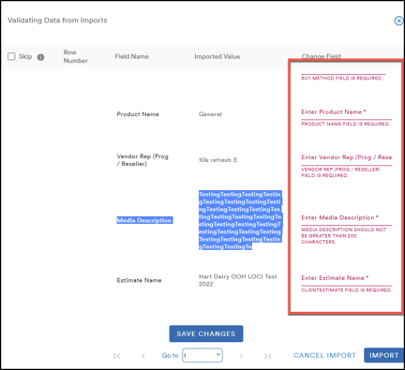
Motionworks updated the error message logic to ensure that all fields with a value or length restriction appear on the “Validating Data” screen, allowing users to edit their data prior to import.
Figure 2: Validating Data from Imports— Correct Error Messages
The Details
Previously, the Media Description field (with a 200-character limit) would give an error to the user only after they imported, and if they happened to open a particular line item. Now, a user has an opportunity to update the description field within the import process.
JIRA Ticket:
- IMXDEV-468
Bug Fixes
Media Types updated on Line Items (Multiple data load symptoms resolved)
When users added a line item, the "poster" value was not appearing under the Media Type dropdown field for Media Details. Motionworks corrected this issue and the searchable “poster” value now appears under Media Type. (Symptom of data load)
Figure 3: Line Items—Media Type Field with “Poster” Value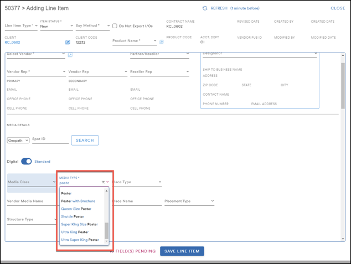
JIRA Tickets:
- IMXDEV-443
- IMXDEV-441
Accepted File Types for Division Logos
Users were unable to upload division logos with SVG files. Motionworks verified that we cannot support SVG files; however, we can support PNG and now JPG files.
JIRA Ticket:
- IMXDEV-400
Billing Address Source Updated
Client invoices were displaying the incorrect billing address. Motionworks corrected the logic to ensure that the correct billing addresses appear based on loading data from Contact Address, rather than Billing Company. This was first discovered on invoices for Jobs; however, it has been corrected on all invoices and media invoices from the Reports module as well.
JIRA Ticket:
- IMXDEV-470
Edit Confirmation Popup Logic Updated
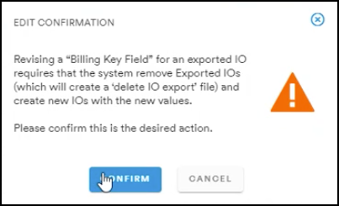
Previously, an Edit Confirmation popup appeared every time a user made an edit on a Line Item Date-related field. This has been corrected and the Edit Confirmation popup only appears as expected, with the first edit of any of these fields that would result into an IO delete/replace, not each date-field entry.
Figure 4: Line Items—Edit Confirmation Popup
JIRA Ticket:
- IMXDEV-448
Contract Line Item IOs in Auto Mode
An error prevented users from being able to enter new start and end dates in Auto mode. Motionworks corrected this and users are now able to enter new start and end dates; additionally, the associated IOs are successfully updated through the delete/replace logic based on new dates.
JIRA Ticket:
- IMXDEV-449
Invalid Values for Vendor and Vendor Rep (Primary) Fields
When users imported line items, the system flagged the values under Vendor and Vendor Rep (Primary) fields as invalid. Users can now successfully import line items and values appear as valid.
- [RE: Lamar/Tampa (AIRPORT)]
JIRA Ticket:
- IMXDEV-406
Values for Invoice Date and Due Date Fields
When users updated the dates on the Invoice Date and Due Date fields, the values reverted to original dates and did not save automatically. By updating the time zones, Motionworks ensured that values now save correctly for these fields.
JIRA Ticket:
- IMXDEV-464
Vendor Contract Date Logic
Previously, updated values would not save when users tried to update the Revised Date field on a line item. Consequently, users could not modify the date at the top of a Vendor Contract. This has been corrected and, when users update the Revised Date on any line item, the date at the top of the Vendor Contract is updated.
JIRA Ticket:
- IMXDEV-442
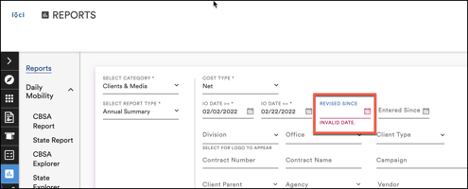
Invalid Date Error Message
An “Invalid Date” error message was appearing on any date fields for Search screens when the date was entered and then removed/deleted. Users are now able to delete values under any date field and an error will not appear.
Figure 5: Error Removing Values from Revised Since Field
JIRA Ticket:
- IMXDEV-88
Incorrect Logic for Removal All Button
Due to an error, when users clicked the Remove All button in IO section, all I/O dates were removed as well as the following four Line Item Date fields:
- Number of Periods
- Period Length
- Start Date
- End Date
Motionworks corrected this and clicking Remove All only clears/removes the records for I/O dates. We adjusted several aspects of Line item data logic to improve function.
Figure 6: Incorrect Logic for Remove All Button
JIRA Tickets:
- IMXDEV-490
- IMXDEV-529 (Contracts_ LI_ when user toggle from Manual to Auto after IO export , the IO's are getting delete & replace in LI)
- IMXDEV-528
Updated PO Number Field
Due to the size of the field being too small, the full value of the cell was not visible in the PO Number field. Motionworks increased the size of the field and the entire value can now be easily read without being cut off.
Figure 7: Updated PO Number Field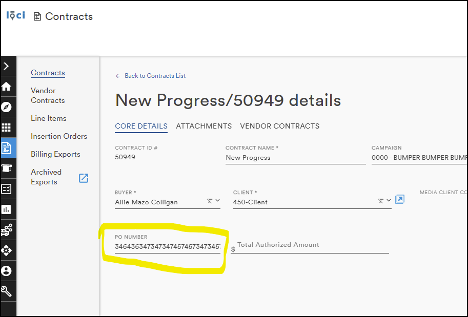
JIRA Ticket:
- IMXDEV-451
Comments
0 comments
Please sign in to leave a comment.